Vinimay LogoVinimay Text
About Us
Features
GST Billing & InvoicingInventory ManagementPOS BillingCustomer ManagementVendor ManagementTransaction Management
Solutions

Business Solutions

Choose a solution built for your business

General

Billing, inventory & accounts

→

Travels

Bookings, routes & billing

→

Courier

Tracking, delivery & billing

→

Transportation

Trips, vehicles & expenses

→

Marbles

Stock, units & sales

→

Restaurant & Cafe

Sales, stock & vendors

→

Kirana & Grocery

Billing, inventory & invoice

→

Service

Sales, raw material & stock

→

Manufacturing

Production, raw material & stock

→

Trading

Purchase, sales & stock ledger

→
Explore All Solutions→
Pricing
Knowledge Centre

Knowledge Base→

Step-by-step product tutorials & setup

Blogs→

Industry news, GST & tax tips

IN
About Us→
All FeaturesGST Billing & InvoicingInventory ManagementPOS BillingCustomer ManagementVendor ManagementTransaction Management
All SolutionsGeneralTravelsCourierTransportationMarblesRestaurant & CafeKirana & GroceryServiceManufacturingTrading
Pricing→

Knowledge Base

Product help & tutorials

→

Blogs

Industry news & tax tips

→

Region / Country

India

© 2025 Vinimay. All rights reserved.

🏠Getting Started
Quick setup guideHow to Add Unlimited Custom Business Fields to InvoicesHow to Set/Change Language in Vinimay Mobile AppHow to Update Phone Number/e-Mail of a BusinessHow to Add or Delete a Business in Vinimay AccountWhy Vinimay is a Better Alternative to Vyapar App
📋Billing & Invoicing
How to Add a Receiver's Signature Field to Your Invoices?How to Use Party-Wise Item PricesHow to Add and Edit Party Names for Shipping Addresses?Add Precise Quantities with Up to 4 Decimal Places
🛒Inventory Management
How to Add Items and Manage StockHow to Track Low Stock Alerts
👥Party Management
How to Add Customers and SuppliersHow to Send WhatsApp Payment Reminders
💰Accounting
How to Record Expense Entries in VinimayManaging Cash & Bank Accounts
📊Grow your business
How to Set Up Online Store in VinimayTrip & Fleet Management Guide
Contents

INVOICE

Billing
Made
Simple
Simpler billing. Brighter businesses.

Let's grow your business together.

Quick Setup

Get started in minutes

Secure & Reliable

Your data is safe with us

Built for Growth

Simple. Practical. Useful.

Vinimay Logo

Smart Billing. Stronger Businesses.

finaxis.in@gmail.com

Product

  • GST Billing & Invoicing
  • Inventory Management
  • POS Billing
  • Customer Management
  • Vendor Management
  • Transaction Management

Solutions

  • General
  • Travels
  • Courier
  • Transportation
  • Kirana & Grocery
  • Restaurant & Cafe
  • Marbles
  • Service
  • Manufacturing
  • Trading

Company

  • About Us
  • Features
  • Pricing
Small Businesses
Big Dreams
Vinimay Logo

Smart Billing. Stronger Businesses.

finaxis.in@gmail.com
Small Businesses
Big Dreams

Product

  • GST Billing & Invoicing
  • Inventory Management
  • POS Billing
  • Customer Management
  • Vendor Management
  • Transaction Management

Solutions

  • General
  • Travels
  • Courier
  • Transportation
  • Kirana & Grocery
  • Restaurant & Cafe
  • Marbles
  • Service
  • Manufacturing
  • Trading

Company

  • About Us
  • Features
  • Pricing
  • Blogs
  • Contact Us
  • Careers
Grow
Progress
Repeat

© 2026 Vinimay. All rights reserved.

Built for Growth|Simple Tools. Real Growth.

📄Restaurant customer

Restaurant में नया Employee कैसे जोड़ें?

P

Written By prachi kahar

Updated 25 days ago

Overview

आपके रेस्टोरेंट में एक cashier या वेटर है, जिसे Vinimay इस्तेमाल करना है, और आप उसे अपना पासवर्ड नहीं देना चाहते। सही तरीका यह है कि हर व्यक्ति का अपना employee अकाउंट हो।

Restaurant में नया Employee कैसे जोड़ें?

आपके रेस्टोरेंट में एक cashier या वेटर है, जिसे Vinimay इस्तेमाल करना है, और आप उसे अपना पासवर्ड नहीं देना चाहते। सही तरीका यह है कि हर व्यक्ति का अपना employee अकाउंट हो।

Vinimay के restaurant हिस्से में आप Employees पेज से नया employee बनाते हैं। Add Employee फॉर्म में नाम, username, email, phone, password, role, branch (वैकल्पिक) और 4 अंकों का POS PIN भरना होता है, और एक Active चेकबॉक्स भी है।

यह गाइड login से शुरू होती है और असली स्क्रीनशॉट के साथ बताती है कि Employees पेज कैसे खोलें और नया employee कैसे जोड़ें।

स्टेप 1: Vinimay में Login करें

Vinimay का login पेज खोलें। अगर आप अकाउंट के मालिक हैं तो Client Login चुनें, और अगर आप स्टाफ हैं तो User Login (मार्कर 1)। Username (मार्कर 2) और Password (मार्कर 3) डालें, CAPTCHA कोड लिखें (मार्कर 4) और Sign In पर क्लिक करें (मार्कर 5)।
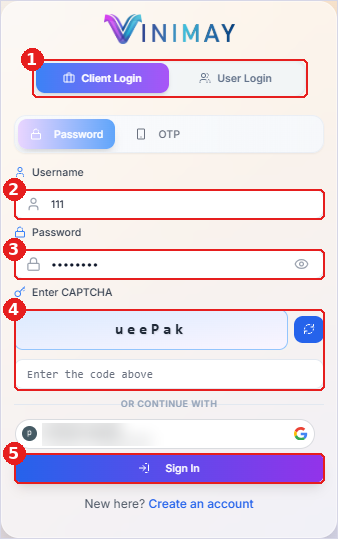
Vinimay login पेज


स्टेप 1: Vinimay में Login करें

स्टेप 2: Dashboard से शुरू करें

Login के बाद आप Dashboard पर आते हैं। बाईं ओर के मेन्यू में Restaurant & Cafe (मार्कर 6) है
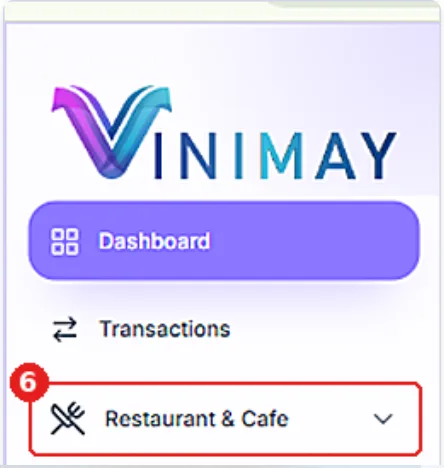
image

स्टेप 2: बायाँ मेन्यू

स्टेप 3: Administration में Employees खोलें

Restaurant & Cafe पर क्लिक करें। Administration के नीचे Employees पर क्लिक करें (मार्कर 7)।


Pasted screenshot


स्टेप 3: Administration > Employees

स्टेप 4: Add Employee पर क्लिक करें

Employees पेज पर शीर्षक के पास employees की गिनती दिखती है, जैसे 0 staff। ऊपर दाईं ओर बैंगनी बटन Add Employee (मार्कर 8) पर क्लिक करें।


Employees पेज और Add Employee बटन


स्टेप 4: Add Employee बटन

स्टेप 5: Add Employee फॉर्म भरें

फॉर्म में लिखा है "Create a new employee account and assign them to a restaurant branch." इन्हें भरें:

  • Full Name (मार्कर 9) और Username (मार्कर 10): ज़रूरी।

  • Email (मार्कर 11) और Phone (मार्कर 12): ज़रूरी।

  • Password (मार्कर 13): ज़रूरी। आँख के आइकन से आप लिखा हुआ देख या छिपा सकते हैं।

  • Role (मार्कर 14): ज़रूरी। फॉर्म में शुरू में Cashier है।

  • Branch (Optional) (मार्कर 15): वैकल्पिक।

  • POS PIN (4-digit) (मार्कर 16): ज़रूरी।

  • Active (मार्कर 17): एक चेकबॉक्स जो शुरू में चुना होता है।

फिर Create Employee (मार्कर 18) पर क्लिक करें, या Cancel से बंद करें।
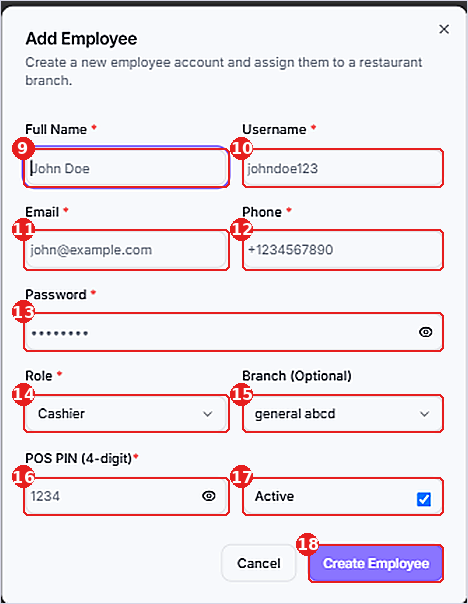
Add Employee फॉर्म


स्टेप 5: Add Employee फॉर्म

फ़ील्ड एक नज़र में

फ़ील्ड

ज़रूरी है?

Full Name, Username, Email, Phone

हाँ

Password

हाँ

Role

हाँ (शुरू में Cashier)

Branch

नहीं (Optional)

POS PIN (4-digit)

हाँ

Active

नहीं (शुरू में चुना होता है)

काम की बातें

  • हर व्यक्ति को अलग username दें, ताकि पता रहे कि किसने क्या किया।

  • पासवर्ड मज़बूत रखें और सिर्फ़ उसी employee को बताएँ।

  • हर व्यक्ति के लिए सही Role चुनें।

  • जो लोग आज काम पर हैं, उनका Active बॉक्स चुना रहने दें।

निष्कर्ष

Vinimay में नया employee जोड़ने के लिए Restaurant & Cafe, Administration, Employees पर जाएँ और Add Employee पर क्लिक करें। नाम, username, email, phone, password, role और POS PIN भरें।

लाल तारे (*) वाले सभी फ़ील्ड ज़रूरी हैं, इसलिए Create Employee से पहले उन्हें जाँच लें। Branch वैकल्पिक है।

जोड़ने के बाद employee आपके Employees पेज पर दिखेगा। आज ही Vinimay का फ्री अकाउंट बनाएँ और अपने स्टाफ को जोड़ें।


Frequently Asked Questions

Did this article solve your question?

Not really
Somewhat
Very helpful!

More in Restaurant customer📄

Vinimay में Restaurant Inventory कैसे मैनेज करें?Vinimay Restaurant में मेन्यू आइटम कैसे जोड़ेंVinimay Restaurant POS Reports: Executive रिपोर्ट आसान भाषा मेंVinimay Restaurant में कस्टमर कैसे जोड़ें

Vinimay में Restaurant Inventory कैसे मैनेज करें?

Next
Previous

Restaurant में Ingredients का Stock कम होने पर कैसे चेक करें?

Still Have Questions?

Talk directly with our product specialist team

Our customer support team is available Mon-Sat, 9:00 AM - 7:00 PM IST to help you configure your business.

Email Support: finaxis.in@gmail.com
Contents