Vinimay LogoVinimay Text
About Us
Features
GST Billing & InvoicingInventory ManagementPOS BillingCustomer ManagementVendor ManagementTransaction Management
Solutions

Business Solutions

Choose a solution built for your business

General

Billing, inventory & accounts

→

Travels

Bookings, routes & billing

→

Courier

Tracking, delivery & billing

→

Transportation

Trips, vehicles & expenses

→

Marbles

Stock, units & sales

→

Restaurant & Cafe

Sales, stock & vendors

→

Kirana & Grocery

Billing, inventory & invoice

→

Service

Sales, raw material & stock

→

Manufacturing

Production, raw material & stock

→

Trading

Purchase, sales & stock ledger

→
Explore All Solutions→
Pricing
Knowledge Centre

Knowledge Base→

Step-by-step product tutorials & setup

Blogs→

Industry news, GST & tax tips

IN
About Us→
All FeaturesGST Billing & InvoicingInventory ManagementPOS BillingCustomer ManagementVendor ManagementTransaction Management
All SolutionsGeneralTravelsCourierTransportationMarblesRestaurant & CafeKirana & GroceryServiceManufacturingTrading
Pricing→

Knowledge Base

Product help & tutorials

→

Blogs

Industry news & tax tips

→

Region / Country

India

© 2025 Vinimay. All rights reserved.

🏠Getting Started
Quick setup guideHow to Add Unlimited Custom Business Fields to InvoicesHow to Set/Change Language in Vinimay Mobile AppHow to Update Phone Number/e-Mail of a BusinessHow to Add or Delete a Business in Vinimay AccountWhy Vinimay is a Better Alternative to Vyapar App
📋Billing & Invoicing
How to Add a Receiver's Signature Field to Your Invoices?How to Use Party-Wise Item PricesHow to Add and Edit Party Names for Shipping Addresses?Add Precise Quantities with Up to 4 Decimal Places
🛒Inventory Management
How to Add Items and Manage StockHow to Track Low Stock Alerts
👥Party Management
How to Add Customers and SuppliersHow to Send WhatsApp Payment Reminders
💰Accounting
How to Record Expense Entries in VinimayManaging Cash & Bank Accounts
📊Grow your business
How to Set Up Online Store in VinimayTrip & Fleet Management Guide
Contents

INVOICE

Billing
Made
Simple
Simpler billing. Brighter businesses.

Let's grow your business together.

Quick Setup

Get started in minutes

Secure & Reliable

Your data is safe with us

Built for Growth

Simple. Practical. Useful.

Vinimay Logo

Smart Billing. Stronger Businesses.

finaxis.in@gmail.com

Product

  • GST Billing & Invoicing
  • Inventory Management
  • POS Billing
  • Customer Management
  • Vendor Management
  • Transaction Management

Solutions

  • General
  • Travels
  • Courier
  • Transportation
  • Kirana & Grocery
  • Restaurant & Cafe
  • Marbles
  • Service
  • Manufacturing
  • Trading

Company

  • About Us
  • Features
  • Pricing
Small Businesses
Big Dreams
Vinimay Logo

Smart Billing. Stronger Businesses.

finaxis.in@gmail.com
Small Businesses
Big Dreams

Product

  • GST Billing & Invoicing
  • Inventory Management
  • POS Billing
  • Customer Management
  • Vendor Management
  • Transaction Management

Solutions

  • General
  • Travels
  • Courier
  • Transportation
  • Kirana & Grocery
  • Restaurant & Cafe
  • Marbles
  • Service
  • Manufacturing
  • Trading

Company

  • About Us
  • Features
  • Pricing
  • Blogs
  • Contact Us
  • Careers
Grow
Progress
Repeat

© 2026 Vinimay. All rights reserved.

Built for Growth|Simple Tools. Real Growth.

📄Company

What Is the "Income Tax Login Password" Field in the Vinimay Company Form?

L

Written By lakshita

Updated 29 days ago

Overview

At the bottom of the first step of the company form in Vinimay there is a field called "Income Tax Login Password". Because it asks for a password, you wonder what it is for and whether you have to fill it in.

At the bottom of the first step of the company form in Vinimay there is a field called "Income Tax Login Password". Because it asks for a password, you wonder what it is for and whether you have to fill it in.

The field has no red star, so it is optional. You can create and use your company without filling it in. The form itself does not explain what the password is used for.

This guide starts from the login page and shows where the field is, with real screenshots of Vinimay. Because it is a password field, it also tells you what to check before you enter anything.

Step 1: Log in to Vinimay

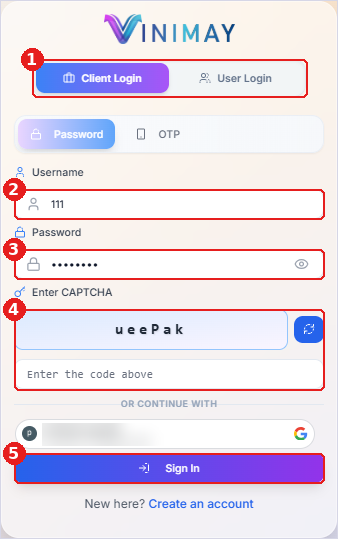
Open the Vinimay login page. Choose Client Login for the account owner or User Login for staff (marker 1). Enter the Username (marker 2) and Password (marker 3), type the CAPTCHA (marker 4), and click Sign In (marker 5).

Vinimay login page

Step 1: Log in to Vinimay

Step 2: Open Companies from the Dashboard

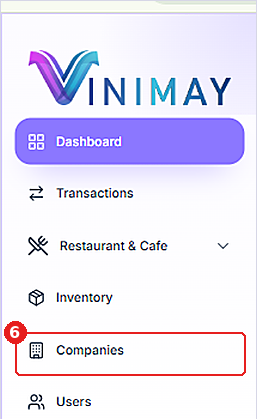
After you sign in, you land on the Dashboard. In the left menu, click Companies (marker 6).

Vinimay left menu with Companies

Companies in the left menu

Step 3: Open the company with the three-dot button

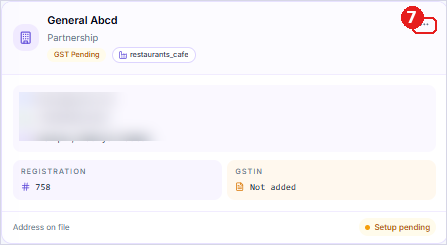
Find your company card and click the three-dot button at its top right (marker 7). The window that opens is titled Edit Company.

Vinimay company card with three-dot button

The company card

Step 4: Find the field

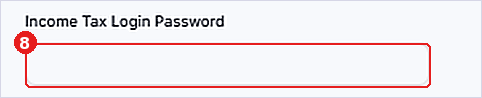
In step 1, Company Basic Details, scroll to the end. The last field is Income Tax Login Password (marker 8). It has no red star, so you can leave it empty.

Vinimay Income Tax Login Password field

The Income Tax Login Password field

Step 5: Decide before you fill it in

The form does not say how the password is used. Before you enter a password for any account, ask your account admin or your CA why it is needed. If you are not sure, leave the field empty. You can always edit the company later and add it.

Tips

  • Leave the field empty if you are not sure.

  • Ask your CA or your admin before you enter any password.

  • Never share your login passwords in public places.

  • You can edit the company later and add it.

Conclusion

The Income Tax Login Password is an optional field at the end of step 1 of the Vinimay company form.

The form does not explain its use, so check with your CA or your account admin before you fill it in.

If in doubt, leave it empty and add it later. Create a free Vinimay account and set up your company today.

Frequently Asked Questions

Did this article solve your question?

Not really
Somewhat
Very helpful!

More in Company📄

Vinimay में और Companies या Users क्यों नहीं जोड़ पा रहा? Plan Limits जाँचेंVinimay में Staff को Roles और Permissions के साथ Access कैसे दें?How to Add a Company Logo and Brand Color in VinimayHow to Add GST Details to an Existing Company in Vinimay

Vinimay में और Companies या Users क्यों नहीं जोड़ पा रहा? Plan Limits जाँचें

Next
Previous

How to Add a Company in Vinimay

Still Have Questions?

Talk directly with our product specialist team

Our customer support team is available Mon-Sat, 9:00 AM - 7:00 PM IST to help you configure your business.

Email Support: finaxis.in@gmail.com
Contents