Vinimay LogoVinimay Text
About Us
Features
GST Billing & InvoicingInventory ManagementPOS BillingCustomer ManagementVendor ManagementTransaction Management
Solutions

Business Solutions

Choose a solution built for your business

General

Billing, inventory & accounts

→

Travels

Bookings, routes & billing

→

Courier

Tracking, delivery & billing

→

Transportation

Trips, vehicles & expenses

→

Marbles

Stock, units & sales

→

Restaurant & Cafe

Sales, stock & vendors

→

Kirana & Grocery

Billing, inventory & invoice

→

Service

Sales, raw material & stock

→

Manufacturing

Production, raw material & stock

→

Trading

Purchase, sales & stock ledger

→
Explore All Solutions→
Pricing
Knowledge Centre

Knowledge Base→

Step-by-step product tutorials & setup

Blogs→

Industry news, GST & tax tips

IN
About Us→
All FeaturesGST Billing & InvoicingInventory ManagementPOS BillingCustomer ManagementVendor ManagementTransaction Management
All SolutionsGeneralTravelsCourierTransportationMarblesRestaurant & CafeKirana & GroceryServiceManufacturingTrading
Pricing→

Knowledge Base

Product help & tutorials

→

Blogs

Industry news & tax tips

→

Region / Country

India

© 2025 Vinimay. All rights reserved.

🏠Getting Started
Quick setup guideHow to Add Unlimited Custom Business Fields to InvoicesHow to Set/Change Language in Vinimay Mobile AppHow to Update Phone Number/e-Mail of a BusinessHow to Add or Delete a Business in Vinimay AccountWhy Vinimay is a Better Alternative to Vyapar App
📋Billing & Invoicing
How to Add a Receiver's Signature Field to Your Invoices?How to Use Party-Wise Item PricesHow to Add and Edit Party Names for Shipping Addresses?Add Precise Quantities with Up to 4 Decimal Places
🛒Inventory Management
How to Add Items and Manage StockHow to Track Low Stock Alerts
👥Party Management
How to Add Customers and SuppliersHow to Send WhatsApp Payment Reminders
💰Accounting
How to Record Expense Entries in VinimayManaging Cash & Bank Accounts
📊Grow your business
How to Set Up Online Store in VinimayTrip & Fleet Management Guide
Contents

INVOICE

Billing
Made
Simple
Simpler billing. Brighter businesses.

Let's grow your business together.

Quick Setup

Get started in minutes

Secure & Reliable

Your data is safe with us

Built for Growth

Simple. Practical. Useful.

Vinimay Logo

Smart Billing. Stronger Businesses.

finaxis.in@gmail.com

Product

  • GST Billing & Invoicing
  • Inventory Management
  • POS Billing
  • Customer Management
  • Vendor Management
  • Transaction Management

Solutions

  • General
  • Travels
  • Courier
  • Transportation
  • Kirana & Grocery
  • Restaurant & Cafe
  • Marbles
  • Service
  • Manufacturing
  • Trading

Company

  • About Us
  • Features
  • Pricing
Small Businesses
Big Dreams
Vinimay Logo

Smart Billing. Stronger Businesses.

finaxis.in@gmail.com
Small Businesses
Big Dreams

Product

  • GST Billing & Invoicing
  • Inventory Management
  • POS Billing
  • Customer Management
  • Vendor Management
  • Transaction Management

Solutions

  • General
  • Travels
  • Courier
  • Transportation
  • Kirana & Grocery
  • Restaurant & Cafe
  • Marbles
  • Service
  • Manufacturing
  • Trading

Company

  • About Us
  • Features
  • Pricing
  • Blogs
  • Contact Us
  • Careers
Grow
Progress
Repeat

© 2026 Vinimay. All rights reserved.

Built for Growth|Simple Tools. Real Growth.

📄Billing & Invoicing

What Is a GST Invoice? Format, Rules & Mandatory Details

P

Written By prachi kahar

Updated 11 days ago

Overview

A GST invoice is more than a bill. It is the document your customer uses to claim input tax credit and the document you use to report your sales. If a detail is missing or wrong, both of you can face problems at the time of filing.


What Is a GST Invoice, and What Details Must It Include?

A GST invoice is more than a bill. It is the document your customer uses to claim input tax credit and the document you use to report your sales. If a detail is missing or wrong, both of you can face problems at the time of filing.

This guide explains what a GST invoice is, the details Rule 46 of the CGST Rules requires, the numbering and time limits, and a simple format you can follow. You will also see the matching fields in a Vinimay document window, with numbered screenshots.

Vinimay is free GST billing and accounting software built for small businesses. It is free to get started, and it asks for the same kinds of details a clean invoice needs, so you can build good habits from your first bill.

What Is a GST Invoice?

A GST invoice is a commercial document issued by a GST-registered supplier when selling taxable goods or services. It contains details such as the supplier's GSTIN, invoice number, date, customer information, taxable value, applicable GST rate and tax amount. It serves as an important document for recording sales and claiming eligible Input Tax Credit (ITC).Remove_User_Login_Clear
Step 1: Company, date, customer and address

Choose the Company (image 1), set the Transaction Date (image 2), type the customer name (image 3) and check the Shipping Address (image 4). These match the supplier, the date and the recipient details on an invoice.
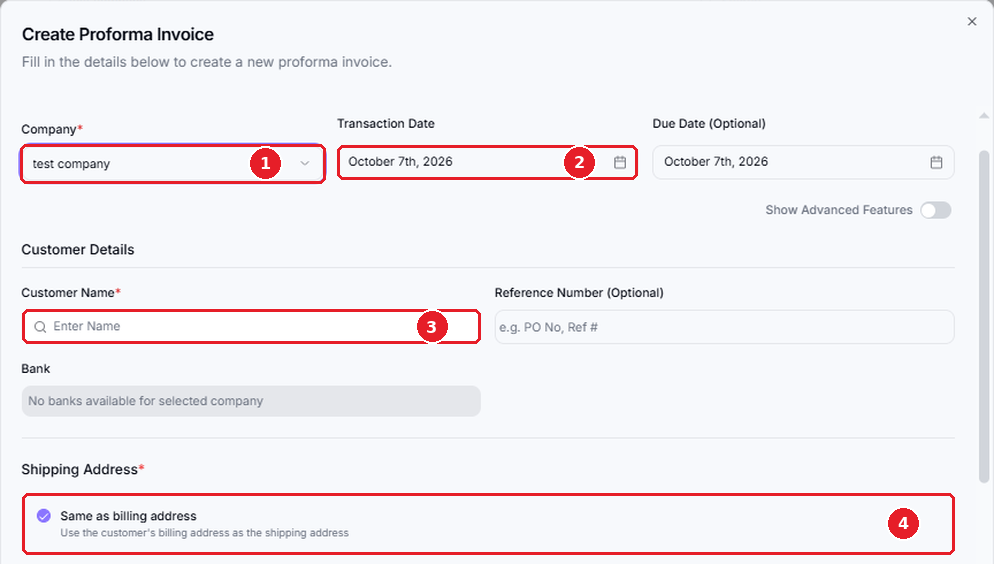
Vinimay Create Proforma Invoice window with company, date, customer name and shipping address

Company, date, customer and address

Step 2: The item row

For each item, enter the Qty (image 5), the Unit (image 6) and the Price/Unit (image 7). The Amount (image 8) shows the line value. The HSN Code field (image 9) is where the classification of the item goes.

Vinimay item row with quantity, unit, price per unit, amount and HSN code

Item row with HSN Code

Step 3: Terms and totals

The Notes box (image 10) holds your terms. Check the Subtotal and invoice total (image 11) before you create the document.
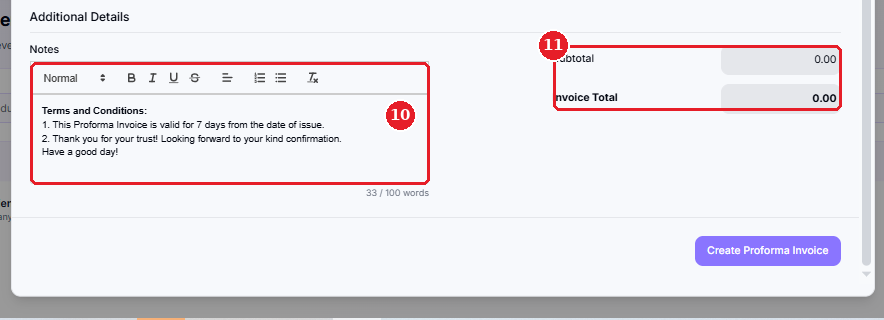
Vinimay notes box and subtotal and invoice total

Notes and totals

Common Mistakes to Avoid

  • Skipping the HSN or SAC code.

  • Repeating or skipping invoice numbers.

  • Wrong GSTIN of the recipient.

  • Wrong place of supply, which gives the wrong tax type.

  • Issuing a tax invoice instead of a Bill of Supply under composition.

Conclusion

A GST invoice is simple when you follow a checklist. Show your details, a unique number and date, the recipient’s details, the HSN or SAC code, the value and the tax.

Issue the invoice on time, keep the numbering clean and use a Bill of Supply when your scheme requires one. If a mistake happens, correct it with a note and not by editing.

Good software makes the checklist a habit. Vinimay asks for the core details every time, so your invoices stay consistent from the first bill.


Frequently Asked Questions

Did this article solve your question?

Not really
Somewhat
Very helpful!

More in Billing & Invoicing📄

How to Share an Invoice on WhatsApp from VinimayWhat Does "GST Pending" Mean on Your Company in Vinimay?What Are Additional Services in Vinimay? (How to Add a Service to a Bill)How to Read the Inventory Daily Summary in Vinimay (Step-by-Step)

How to Share an Invoice on WhatsApp from Vinimay

Next
Previous

How to Create an Invoice with Different Units in Vinimay

Still Have Questions?

Talk directly with our product specialist team

Our customer support team is available Mon-Sat, 9:00 AM - 7:00 PM IST to help you configure your business.

Email Support: finaxis.in@gmail.com
Contents