How to Add TAN and TDS Details to Your Company in Vinimay
If your business deducts TDS, you need your TAN and TDS details in Vinimay. The company is already created, and you want to add them without making a new company.
The Edit Company window has a third step called Company TDS Details. It has five fields: TAN Number, Tax Deduction/Collection A/c, Deductor Type, TDS Login Username and TDS Login Password. This is the last step, so the Save Changes button is here.
This guide starts from the login page and shows with real screenshots how to reach this step and fill it in.
Step 1: Log in to Vinimay.
Open the Vinimay login page. Choose Client Login for the account owner or User Login for staff (marker 1). Enter the username (marker 2) and Password (marker 3), type the CAPTCHA (marker 4), and click Sign In (marker 5).
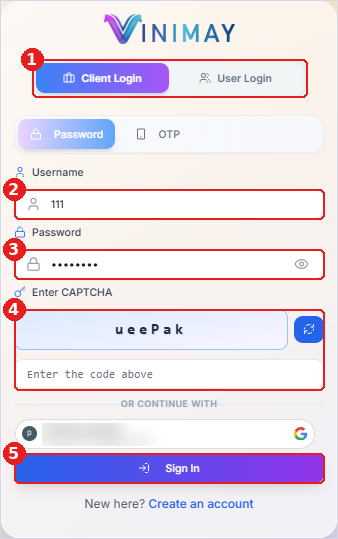
Step 1: Log in to Vinimay
Step 2: Open Companies from the Dashboard
After you sign in, you land on the Dashboard. In the left menu, click Companies (marker 6).
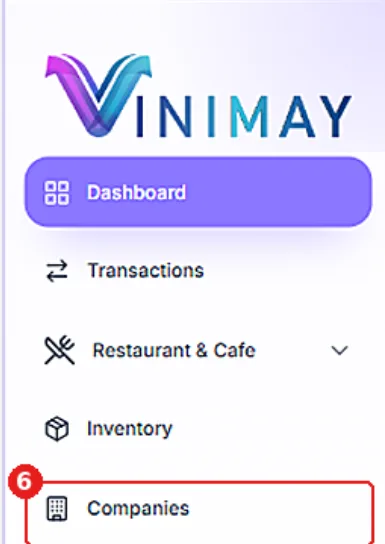
Step 2: Companies in the left menu
Step 3: Open the company for editing
Find your company card and use the three-dot button at its top right (marker 7). The window that opens is titled Edit Company. Go through the first two steps with Next until you reach step 3.
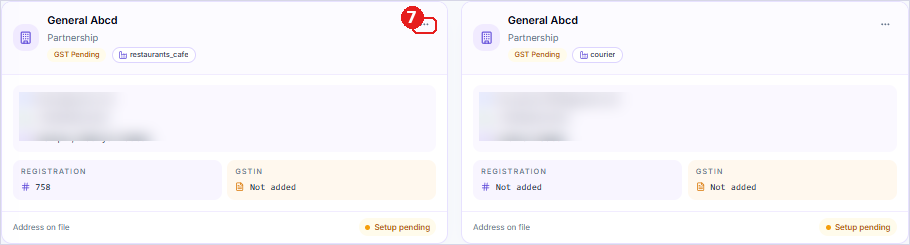
Step 3: The company card
Step 4: Fill in the Company TDS Details
TAN Number (marker 8)
Tax Deduction/Collection A/c (marker 9)
Deductor Type (marker 10)
TDS Login Username (marker 11)
TDS Login Password (marker 12)
None of the fields has a red star. Click Save Changes (marker 13) to save, or go back to previous.
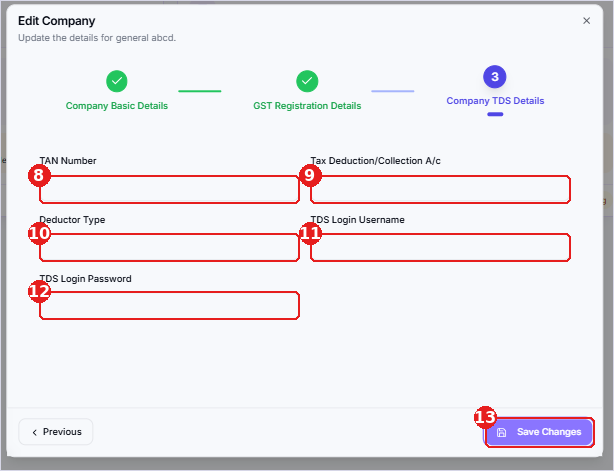
Step 4: Company TDS Details
Tips
Keep your TAN ready before you start.
Check the TAN for typing mistakes before you save.
Use Previous if you need to correct an earlier step.
Ask your CA for the deductor type and the account details.
Conclusion
You add TDS details to a company in Vinimay in the third step of Edit Company. The step has TAN number, Tax Deduction/Collection A/c, the Deductor Type and the TDS login username and password.
Open the company from its card, go to the last step and click Save Changes. Check the details with your CA if you are unsure.
Keeping these details in one place saves time later. Create a free Vinimay account and complete your company profile today.